
15 Best WordPress AI Blog Writer Plugins Compared 2026

Consistent, high-quality content is the foundation of online success, but creating it manually is exhausting and time-consuming. You know you need to publish regularly to rank on Google, but staring at a blank WordPress editor can quickly become the bottleneck of your business.
The solution is leveraging an AI blog writer plugin that integrates directly into WordPress. These tools promise to put your content strategy on cruise control, but the reality is that they are not all built equally and each has its own strengths, quirks and compromises.
To find out which ones actually work, I spent the last few days installing, configuring, and running 15 different AI content plugins on a fresh WordPress 6.7 test site (where applicable). I didn’t just read their marketing pages; I generated over 50 articles, tracked token usage, measured output quality, and tested their SEO capabilities.
Table of Contents
- How I Tested and Ranked These Plugins
- The Overall Best AI Blog Writer
- The Elite Alternatives
- The Specialized Writing Assistants
- The Developer & Builder Focused Tools
- The Budget & Niche Options
- Comparison Table
- How to Choose the Right Plugin
- Google’s Policy on AI Content in 2026
- Best Practices for AI Content
- Frequently Asked Questions
How I Tested and Ranked These AI Writer Plugins
In order to fairly and accurately test and compare each of the plugins, I created a controlled testing environment: WordPress 6.7 running PHP 8.2 on the default Twenty Twenty-Four theme.
I evaluated each plugin using the following standardized rubric:
- Content Quality (30%): I used a standard 1,500-word prompt for every tool. I checked for hallucination rates, formatting structure, and whether the tone sounded human or robotic.
- Automation Depth (25%): Measured by “clicks to publish.” Does the plugin require constant manual prompting, or is it a true “set and forget” system?
- SEO & AEO Architecture (20%): Does it generate valid meta data and schema markup? Does it handle internal linking automatically? Is it optimized for Answer Engine Optimization (AEO) to rank in AI Overviews?
- Value & Pricing Model (15%): I looked closely at subscription traps versus pay-as-you-go models, calculating the actual cost per 1,000 words.
- Rich Media (10%): The quality of auto-generated featured and inline images.
The Overall Best AI Blog Writer
1. BlogWolf – Best for True Auto-Pilot & Value

When testing BlogWolf, the standout feature was immediately obvious: the Auto-Pilot mode. Unlike almost every other tool on this list where I had to babysit the generation process, I simply loaded 10 target keywords into BlogWolf, set my desired publishing frequency, and walked away. An hour later, a fully formatted, image-rich post was live on my WordPress blog.
BlogWolf was built specifically for WordPress site owners who want to scale their content without paying expensive monthly subscriptions. It operates on a pay-as-you-go credit system, meaning you only pay for what you use, and credits never expire.
The Experience: Using BlogWolf is extremely simple. You just enter your preferences and click ‘Generate Article’ to produce a full article with AI-generated images in one click. The integration with Yoast SEO is seamless. Every article I generated automatically included a Yoast focus keyphrase and meta description. The tool also handled technical SEO elements like adding a table of contents, author bio, FAQs and image alt text without any manual input. If you’d like to see it in action before signing up, this step-by-step BlogWolf tutorial on YouTube walks through the full setup.
Output Sample: “Relying on a single income source creates vulnerability. A gallery contract ends. Commission work dries up. Instead, create a portfolio of revenue streams that work together.”
Key Features:
- True Auto-Pilot Mode: Go from keyword to published post with zero clicks.
- Rich Media Included: Automatically generates and embeds featured and inline images.
- Built to Rank: Handles technical SEO, automatic internal linking, and AEO (AI Engine Optimization).
- Yoast Integration: Automatically populates Yoast SEO fields.
Honest Drawback: Because BlogWolf is designed for full, hands-off automation, users who want granular, sentence-by-sentence editing during the AI generation process might prefer a block-editor tool like Jetpack AI. (Note: You can still edit any BlogWolf article in WordPress before publishing, but the initial generation is designed to be hands-off). Additionally, it focuses purely on content generation rather than offering a massive suite of disparate SEO tools—some may see this as a limitation, though its simplicity is its core strength.
The Elite Alternatives
If you have specific workflow requirements that don’t align with full automation, these are the top alternatives I tested.
2. Rank Math Content AI – Best for the Rank Math Ecosystem
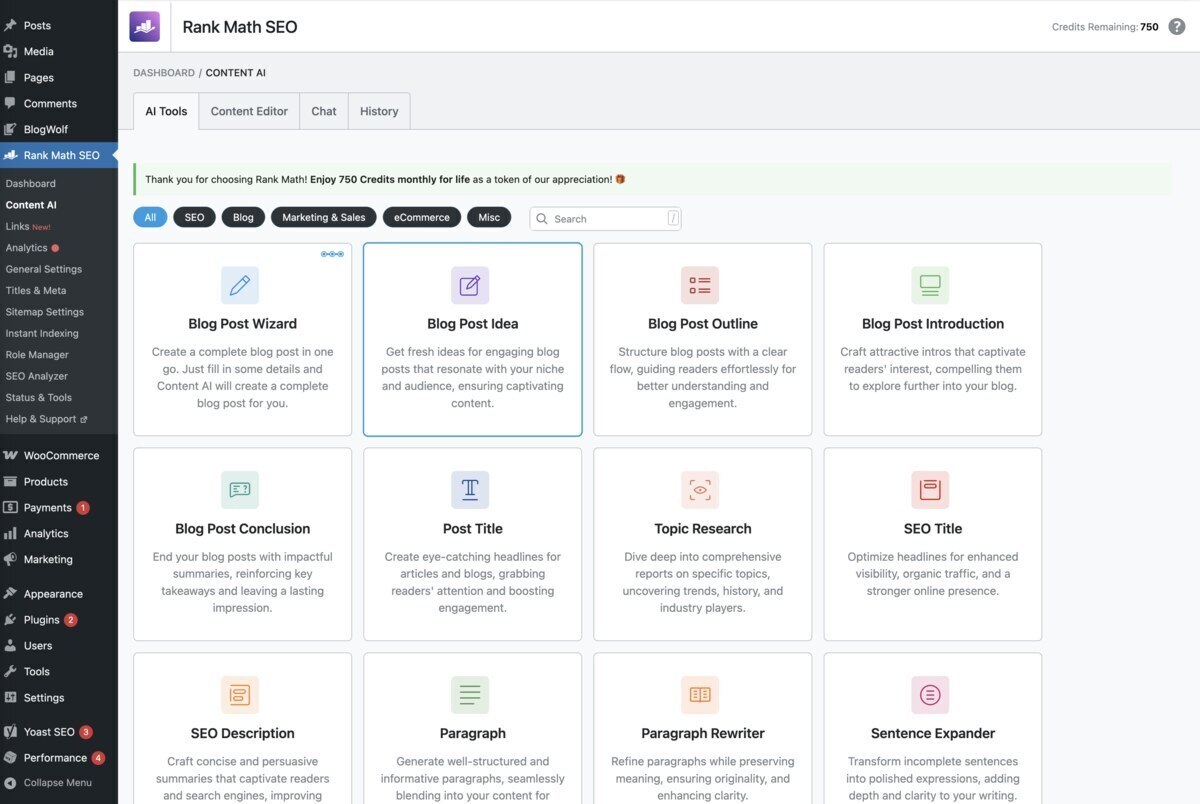
If you already use Rank Math as your primary SEO plugin, their Content AI add-on is a natural fit. It acts as a highly capable assistant directly within the WordPress block editor, Classic editor, Elementor, or Divi.
Rank Math includes a wide range of different AI writing features. Almost too many features for my specific use case. I just wanted the AI to write me an article. The Blog Post Wizard is the closest that Rank Math comes to one-click post generation, but it was still quite involved, and unfortunately it’s a feature that can’t be tested using your free credits.
The Experience: Rank Math requires you to be heavily involved in the process. It’s not an auto-pilot tool; it’s an assistant. It analyzes your target keyword and provides a dynamic SEO score, suggesting exactly how many words, headings, and images you need to beat the competition.
Pros
- Deep integration with the Rank Math SEO plugin.
- Excellent real-time SEO scoring and keyword suggestions.
- Works seamlessly across multiple page builders.
Cons
- No true auto-pilot or bulk publishing capabilities.
- No built-in image generation.
- Subscription-based pricing model.
3. Koala Writer – Best for Real-Time Data Integration
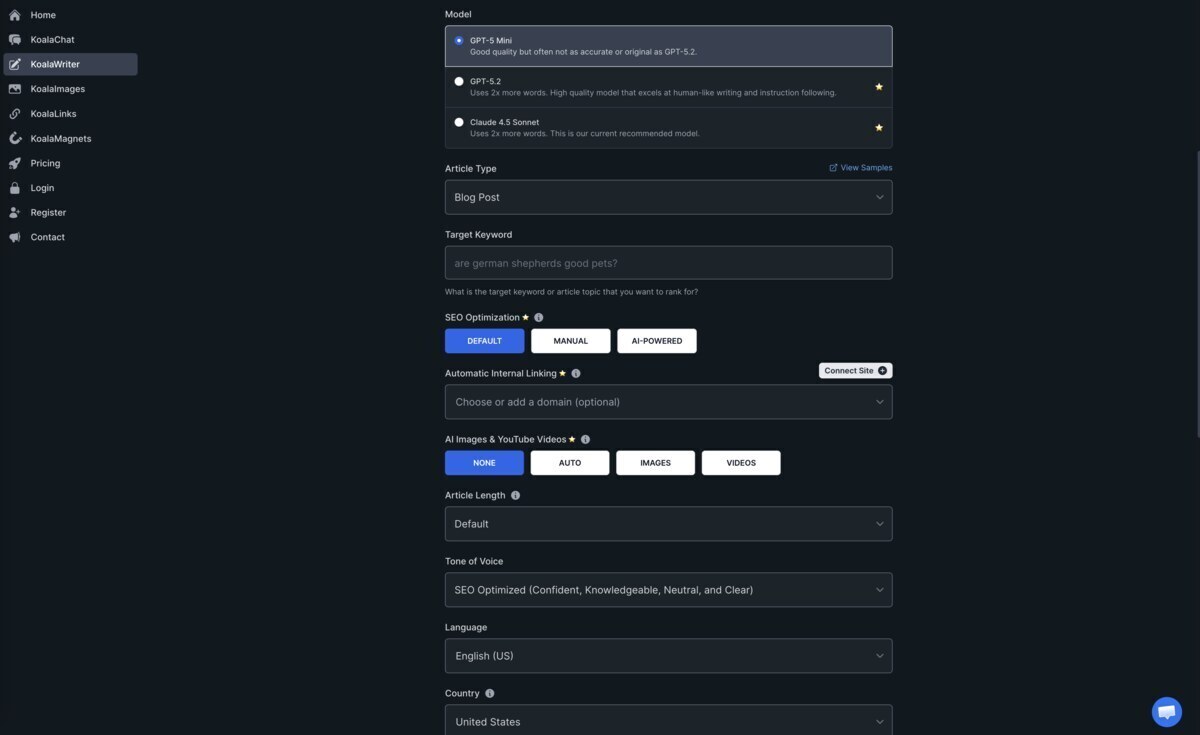
Koala Writer isn’t exclusively a WordPress plugin, but its WordPress integration is robust enough to earn a top spot here. Its biggest differentiator is its ability to scrape real-time Google search results and Amazon data before writing.
The Experience: When I asked Koala to write a review of a product released just last week, it successfully pulled the accurate, current specs by scraping the live SERP. It uses a combination of GPT-5.2 and Claude 4.5 Sonnet, resulting in highly readable, factual content. It also handles AI image generation and can automatically embed relevant YouTube videos.
Pros
- Exceptional at utilizing real-time data and Amazon affiliate integration.
- Uses top-tier models (GPT-5.2 and Claude 4.5 Sonnet).
- Generates images and embeds videos automatically.
Cons
- Very expensive at higher tiers.
- The free trial is extremely limited (5,000 words).
- Primary writing interface is external.
4. eesel AI Blog Writer – Best for Deep Research
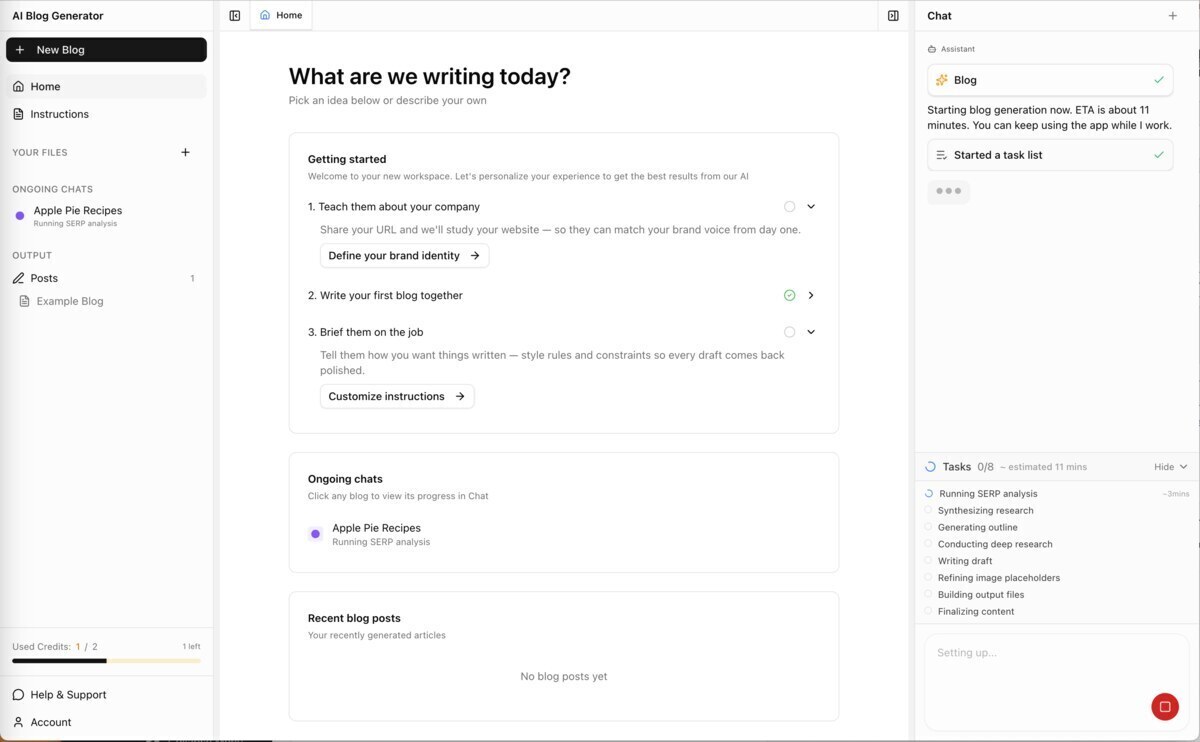
eesel AI takes a unique approach to content generation by focusing heavily on deep research and authentic social proof. It doesn’t just generate text; it pulls in citations, creates infographics, and even scrapes forums to inject “authentic” social proof into the articles.
The Experience: The output from eesel felt incredibly well-researched. The automatic asset generation (videos, infographics, screenshots) is a massive time-saver. However, it operates entirely outside of WordPress, meaning you have to manually move the content over, which slows down the workflow significantly.
Pros
- Outstanding research capabilities with real citations.
- Automatically generates complex assets like infographics.
- Can scrape forums for social proof.
Cons
- No automated publishing directly to WordPress.
- Extremely high price point.
- Not available on the official WordPress.org repository.
5. Jetpack AI Assistant – Best for Basic Block-Editor Assistance
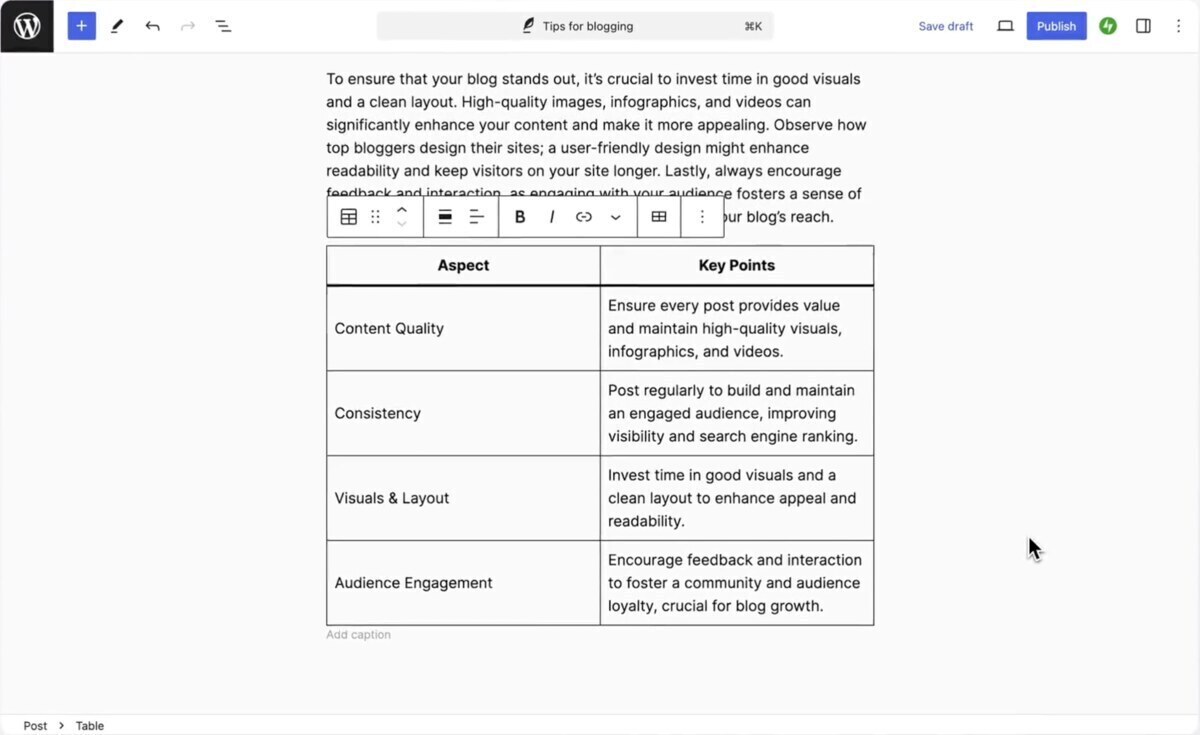
Built by Automattic (the company behind WordPress.com), Jetpack AI is integrated directly into the Gutenberg block editor. It’s designed to be a frictionless writing companion rather than a bulk content generator.
The Experience: Using Jetpack AI feels like having ChatGPT built directly into your text blocks. You can highlight a paragraph and ask it to “change tone,” “summarize,” or “expand.” It’s incredibly intuitive for fixing grammar or generating a quick table, but it struggled when I asked it to write a comprehensive 1,500-word SEO article from scratch.
Pros
- Native, flawless integration with the WordPress block editor.
- Excellent for quick edits, tone adjustments, and grammar checks.
- Very affordable introductory pricing.
Cons
- Cannot generate full, complex articles on auto-pilot.
- Requires the heavier Jetpack plugin ecosystem.
- Lacks dedicated AI-powered SEO optimization.
The Specialized Writing Assistants
These AI writer plugins excel in specific niches, from WooCommerce product descriptions to multi-provider API connections.
6. GetGenie – Best for Marketers Needing Templates
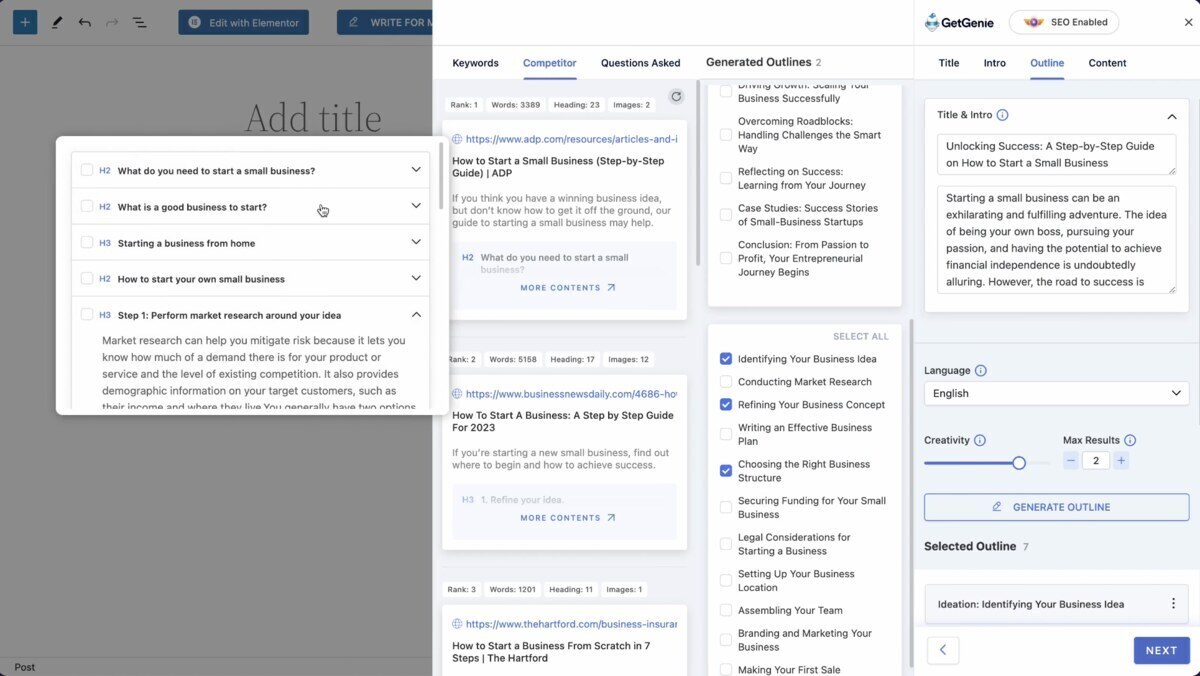
GetGenie positions itself as an all-in-one SEO and content assistant. With over 70,000 active installs, it’s one of the more popular options on the WordPress repository.
The Experience: What impressed me most about GetGenie was its “Blog Wizard.” It walks you through a step-by-step process: generating a title, an intro, an outline, and finally the content. It also includes a WooCommerce Wizard specifically for generating product descriptions. However, it still requires significant manual clicking to get to a finished post.
Pros
- Excellent step-by-step Blog Wizard.
- Built-in keyword research and SERP analysis.
- Includes a dedicated WooCommerce description generator.
Cons
- Requires manual input at every step (no true auto-pilot).
- The free plan is heavily restricted (2,500 words/month).
- The interface can feel cluttered.
7. SEOWriting.ai – Best for Long-Form Bulk Content
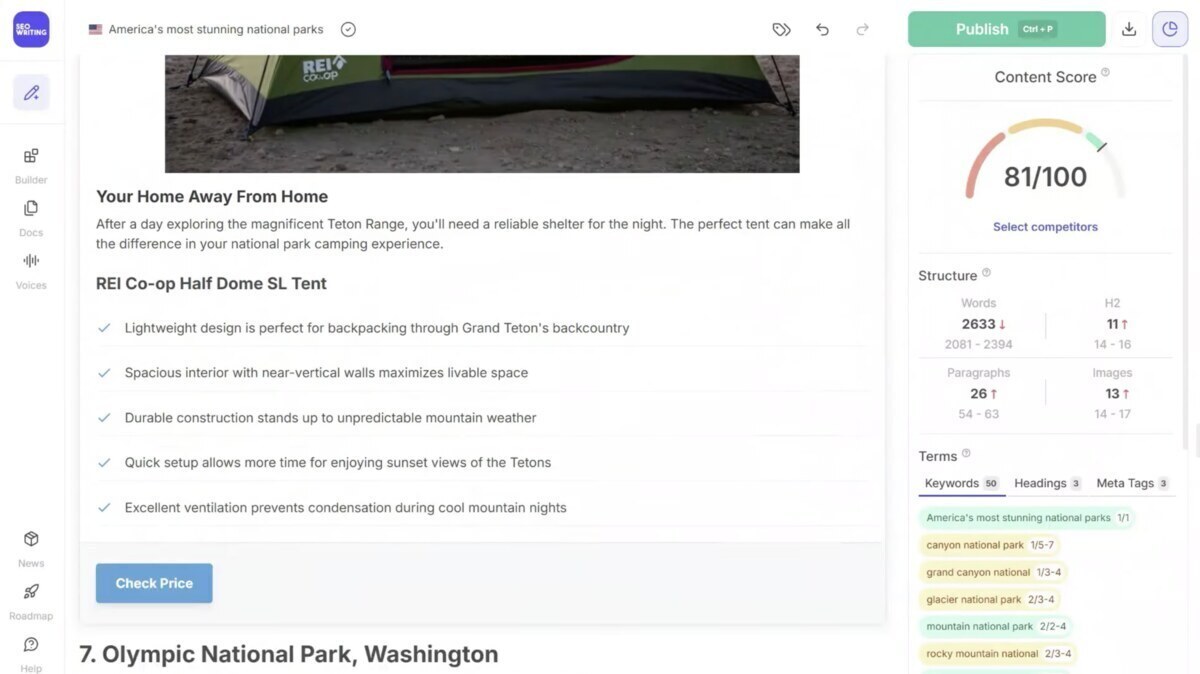
SEOWriting.ai is a powerhouse for generating long-form content in bulk. It is built specifically for affiliate marketers and SEO agencies who need to produce high volumes of text quickly.
The Experience: During my test, I was able to generate a 3,000-word article complete with AI-generated images in under three minutes. It handles Amazon product lists beautifully. It does offer auto-publishing to WordPress via an integration, but the setup process is slightly more complex than native plugins like BlogWolf.
Pros
- Incredible speed for long-form (3,000+ word) articles.
- Strong bulk generation capabilities.
- Generates relevant images automatically.
Cons
- The free plan is limited to just 3 articles.
- Pricing scales up quickly for high-volume users.
- Content can occasionally feel repetitive on longer word counts.
8. BotWriter – Best Multi-Provider Tool
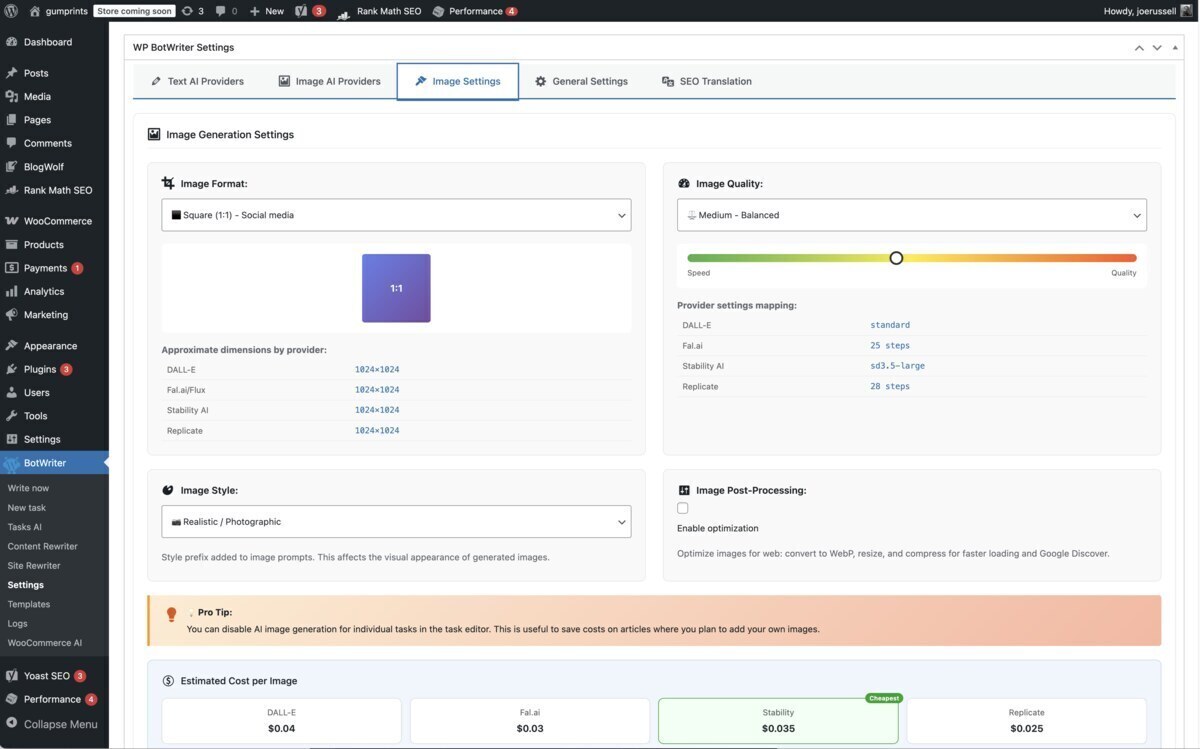
BotWriter takes a “bring your own API” approach, but on steroids. It allows you to connect to over 7 AI text providers (including OpenAI, Anthropic, Google, and Mistral) and 8 image generators.
The Experience: If you love tinkering with different LLMs, this is your plugin. I generated an article using Claude Sonnet 4.5 for the text and Flux 2 Pro for the images, all within WordPress. The output quality is entirely dependent on which API you choose.
Pros
- Unmatched flexibility in choosing your AI model.
- Supports top-tier image generators (DALL-E 3, Flux, Stable Diffusion).
- The plugin itself is completely free.
Cons
- You must manage your own API keys and billing.
- Setup is highly technical.
- Note: As of March 2026, temporarily closed on the WP repository pending review.
9. Artikolo – Best Dedicated WordPress Blogging Assistant
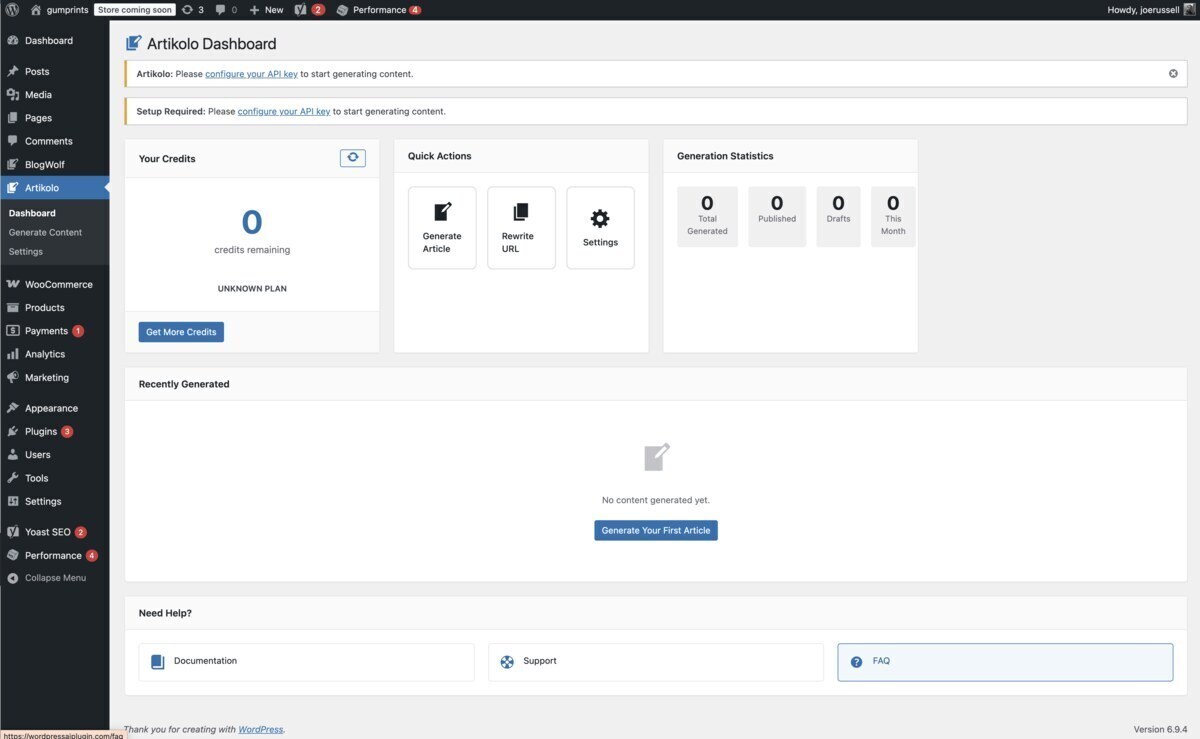
Artikolo is a newer, highly focused tool designed specifically for WordPress blogging. It doesn’t try to be a chatbot or a page builder; it just writes articles.
The Experience: Artikolo successfully generated a well-structured, SEO-optimized article with one click. It can auto-publish directly to WordPress as a draft or live post, and it integrates well with Yoast and Rank Math. However, it lacks built-in image generation.
Pros
- Very clean, focused user interface.
- Good integration with major SEO plugins.
- Includes a content rewriter tool.
Cons
- No AI image generation capabilities.
- Subscription pricing is relatively high for the feature set.
The Developer & Builder Focused Tools
10. AI Engine (by Meow Apps) – Best for Developers
With over 100,000 active installs and a 4.9-star rating, AI Engine is the undisputed king of AI toolkits for WordPress developers.
The Experience: AI Engine is not a simple “click and write” tool. It requires you to input your own API keys. However, it offers features no one else does, like creating custom AI chatbots, AI-powered forms, and managing embeddings. It is incredibly powerful but has a steep learning curve.
Pros
- Unbelievably customizable.
- You pay wholesale API prices rather than SaaS markups.
- Includes chatbots and AI forms.
Cons
- Not user-friendly for beginners.
- No native auto-pilot publishing for blog posts.
- Requires managing external API keys.
11. Divi AI – Best for Divi Theme Users
If you use the Divi theme, Elegant Themes has built an AI specifically for you. It understands the context of your Divi modules and can write text, generate code, and create images directly inside the visual builder.
The Experience: It is magical to click a text module in Divi and have the AI rewrite it to fit the design perfectly. However, it is a closed ecosystem. If you ever switch away from the Divi theme, you lose access to these tools.
Pros
- Flawless integration with the Divi builder.
- Context-aware generation (it knows what your page looks like).
- Excellent image generation and modification.
Cons
- Exclusively locked to the Divi theme.
- Expensive standalone subscription.
12. Elementor AI – Best for Elementor Users
Similar to Divi AI, Elementor AI is built directly into the Elementor page builder. It features an AI Copilot that can generate entire layouts, write copy, and create images.
The Experience: Elementor AI excels at page building rather than blog writing. It can write a great hero section, but it isn’t designed to generate a 2,000-word SEO article on auto-pilot.
Pros
- Native to the Elementor editor.
- Can generate custom CSS and HTML code.
- Works across unlimited sites with one subscription.
Cons
- Uses a confusing credit system where different actions cost different amounts.
- Unused credits do not roll over.
- Not optimized for long-form blog publishing.
The Budget & Niche Options
13. Bertha AI – Best for WooCommerce
Bertha AI integrates directly into WordPress and Chrome. It shines when tasked with writing product descriptions for WooCommerce stores, supporting over 22 languages.
Pros
- Great for e-commerce and product descriptions.
- High word limits on the Pro plan.
Cons
- Removed from the WP repository due to compliance issues.
- No auto-pilot publishing.
14. ContentBot AI Writer – Best for Step-by-Step Workflows
ContentBot offers a unique “AI Content Workflows” feature that lets you build drag-and-drop logic for how content is created.
Pros
- Unique workflow builder.
- Good pay-as-you-go option ($0.50/1000 words).
Cons
- The WordPress plugin hasn’t been updated in over 2 years.
- Uses older GPT-3.5 models by default.
15. All in One SEO (AIOSEO) AI – Best for Meta Optimization
AIOSEO isn’t a blog writer; it’s an SEO plugin with an AI integration specifically for generating highly optimized meta titles and descriptions.
Pros
- Perfect for optimizing existing content.
- Integrated into a top-tier SEO plugin.
Cons
- Primarily designed for meta optimization, not full article generation.
- Requires an additional paid “SEOBoost” subscription for AI features.
Data-Driven Comparison Table: Top AI Content Plugins
To help you make an informed decision, I compiled the data from my testing into a side-by-side comparison. Notice how the pricing models and automation capabilities vary wildly.
| Plugin Name | Best For | Clicks to Publish | Image Gen | Monthly Sub? | Starting Price | Free Trial |
|---|---|---|---|---|---|---|
| BlogWolf | Hands-off automation & value | 0 (True Auto-Pilot) | Yes | No (Pay-as-you-go) | $0 | Yes (50 Credits / ~12 articles) |
| Rank Math Content AI | SEO ecosystem users | 10+ (Manual) | No | Yes | $5.99/mo | Yes (750 credits only) |
| Koala Writer | Real-time data | 5+ (Semi-automated) | Yes | Yes | $9/mo | Yes (5,000 words) |
| GetGenie | Marketing templates | 15+ (Wizard based) | Yes | Yes | $10/mo | Yes (2,500 words/mo) |
| AI Engine | Developers | 10+ (Manual) | Yes (via API) | No (Bring your own API) | $59/yr | Yes (Free core plugin) |
| Jetpack AI | Block editor assistance | 5+ (Manual) | Yes | Yes | $4.95/mo | Yes (20 requests) |
| SEOWriting.ai | Bulk affiliate content | 3 (Bulk setup) | Yes | Yes | $14/mo | Yes (3 articles) |
How to Choose the Right AI Writer Plugin for Your Workflow
With 15+ options available, selecting the right AI content plugin comes down to understanding your specific workflow and budget. Based on my hands-on testing, here is my decision framework:
For the “Set and Forget” Website Owner: If your primary goal is to maintain a consistent publishing schedule without spending hours in the WordPress editor, BlogWolf is the undisputed choice. Its true Auto-Pilot mode means you can enter some keywords on Monday and have the plugin write, format, and publish articles all month long while you sleep.
For the Budget-Conscious Blogger: Most AI tools lock their best features behind $20 to $99 monthly subscriptions. BlogWolf wins here as well because it operates entirely on a pay-as-you-go model. Furthermore, you get 50 free credits on signup, which is enough to generate roughly 12 full-length articles without ever entering a credit card.
For the SEO Purist: If you prefer to write the content yourself but want an AI assistant to guide your keyword density, LSI keywords, and heading structure, Rank Math Content AI is an excellent choice. It won’t write the blog for you on auto-pilot, but it will ensure the blog you write is highly optimized.
For WordPress Developers: If you are comfortable managing OpenAI or Anthropic API keys and want to build custom AI experiences (like chatbots or forms) directly into your site, AI Engine offers the raw power and flexibility developers crave.
Ready to Try BlogWolf?
Get 50 free credits on signup – enough for ~12 full-length articles. No credit card required.
Get Started Free →Google’s Policy on AI Content in 2026: The E-E-A-T Reality Check
One of the most common questions I get from clients is: “Will Google penalize my site if I use an AI writer plugin?”
The short answer is no, but with a major caveat.
Google’s official Search Quality Rater Guidelines clearly state that they reward high-quality, helpful content regardless of how it is produced. What they do penalize is “scaled content abuse”—which means publishing hundreds of low-quality, unedited, unhelpful articles solely to manipulate search rankings.
In 2026, Google relies heavily on the E-E-A-T framework:
- Experience: Does the content show first-hand experience?
- Expertise: Does the author know what they are talking about?
- Authoritativeness: Is the site a recognized authority on the topic?
- Trustworthiness: Is the information accurate and safe?
When you use an AI blog writer plugin, the AI provides the Expertise (by structuring facts) and the Authoritativeness (by using proper schema and SEO architecture, like BlogWolf’s AEO features). However, it is up to you to inject the Experience and Trust.
If you use a tool like BlogWolf on Auto-Pilot, it will generate structurally perfect, highly readable content that can rank well for informational queries. However, for product reviews or opinion pieces, you should always go into WordPress, edit the generated draft, and add your own original photos and real-world data or anecdotes before hitting publish.
Best Practices: How to Humanize Your AI-Generated Blog Posts
To ensure your AI-generated content continues to rank and drive traffic, follow these best practices:
1. Leverage Smart Topic Generation
Don’t just ask the AI to write about “fitness.” Use keyword research tools (or BlogWolf’s built-in topic generation) to find long-tail, low-competition keywords that you actually have a chance of ranking for, such as “best low-impact workouts for bad knees.”
2. Utilize Internal Linking
Orphaned content doesn’t rank. Search engines use internal links to understand the hierarchy of your site. This is why automated internal linking—a core feature of BlogWolf—is so vital. It ensures every new AI article automatically links back to your existing cornerstone content.
3. Fact-Check Everything
Even the most advanced LLMs (like GPT-5.4 and Claude Opus) can hallucinate. You must verify any statistics, dates, or factual claims made by the AI before publishing.
4. Format for Readability
Nobody wants to read a wall of text. Break up your AI-generated content with bullet points, bold text, and images. Tools that automatically generate and insert relevant images save you hours of formatting time.
Conclusion
The landscape of content creation has shifted permanently. You no longer have to spend 4 to 6 hours researching, writing, and formatting a single blog post.
While there are many AI blog writer plugins available for WordPress, my testing revealed a clear divide between tools that merely assist you and tools that actually automate the work.
If you want a writing assistant to help you tweak sentences, Jetpack AI or Rank Math are great choices. But if you want to put your content strategy on true cruise control, BlogWolf offers the most user-friendly set and forget package. With its one-click generation, automatic image insertion, Yoast integration, and zero-subscription pricing model, it handles the heavy lifting so you can focus on growing your business.
Ready to let your blog write itself? Claim your 50 free credits with BlogWolf today and see the difference automation makes.
Frequently Asked Questions (FAQ)
What is the best AI blog writer plugin for WordPress?
Based on our 2026 testing of 15 different tools, BlogWolf is the best overall AI blog writer plugin. It stands out because it offers true auto-pilot publishing, generates both text and images, integrates seamlessly with Yoast SEO, and operates on a flexible pay-as-you-go model rather than requiring an expensive monthly subscription.
Can Google detect content written by an AI writer plugin?
Yes, Google has the technology to detect AI-generated text. However, Google’s official policy states that they do not penalize content simply because it was written by AI. They penalize low-quality, spammy content. As long as your AI-generated articles are helpful, accurate, and properly formatted, they can rank highly in search results.
Are there any free AI content plugins for WordPress?
Most premium AI plugins require a paid subscription. However, BlogWolf offers 50 free credits upon signup (no credit card required), which is enough to generate approximately 12 full-length articles for free. AI Engine also offers a free core plugin, though you must pay for your own API usage.
Do AI blog writers generate images as well?
Some do, but many do not. Plugins like BlogWolf and Koala Writer automatically generate and embed featured images and inline images within the article. Other popular tools, like Rank Math Content AI, focus strictly on text and require you to source your own images.
Do I have to pay a monthly subscription for AI writing plugins?
The industry standard is to charge a monthly subscription ranging from $10 to $99 per month. However, BlogWolf is an exception, offering a pay-as-you-go credit system where you only pay for the articles you generate, and the credits never expire.

Joseph Russell
Award-winning UX Designer and Design Writer. Joseph has spent the last 17 years designing digital user experiences and writing about design and entrepreneurship. He founded BlogWolf after spending thousands of hours on content creation and realizing there had to be a better way. Joseph is the Co-Founder of mobile app agency DreamWalk and Head of UX & Growth at Easy Weddings.
Connect on LinkedIn →