
How to Write a WordPress Article with AI

If you’ve searched for how to write a WordPress article with AI, you’ve probably found a lot of guides that still make you do most of the heavy lifting. You prompt ChatGPT, copy the text, paste it into WordPress, fix the formatting, source images, write your meta description, add internal links — and suddenly forty minutes have disappeared.
There’s a better way. In this guide, we’ll walk you through two distinct approaches: the manual method, where you use a standalone AI tool alongside WordPress and handle the production yourself, and the plugin method, where a dedicated AI blog writing plugin handles the entire pipeline for you.
We’ll cover both in full so you can choose what fits your workflow. But if saving time is the goal, the plugin approach is where most people end up.
Table of Contents
The Two Ways to Write a WordPress Article with AI
Before we get into the how-to, it’s worth understanding what separates these two approaches — because the difference is larger than it might first appear.
The manual method uses a general-purpose AI tool (ChatGPT, Claude, Gemini) to generate your article text, then requires you to bring everything else together in WordPress yourself. It gives you direct control at every stage, but it involves multiple tools, multiple tabs, and a lot of repetitive steps each time.
The plugin method uses a dedicated AI blog writing plugin that handles research, writing, formatting, image generation, and SEO in a single connected workflow — all from inside or linked to your WordPress dashboard. You trade some granular control for a dramatic reduction in time and manual effort. For many business owners and marketers, that’s a trade worth making.
Here’s how the two approaches compare at a glance:
| Manual method | AI blog plugin method | |
|---|---|---|
| Time per article | 20–40 minutes | Under 2 minutes |
| Tools required | AI chatbot + word processor + image tool + Yoast | One plugin |
| Copy/paste required | Yes — extensive | No |
| SEO metadata | Manual | Auto-generated |
| Featured image | Manual sourcing and upload | Auto-generated and embedded |
| Inline images | Manual for each one | Auto-generated and placed |
| Internal links | Manual | Automatic |
| Schema markup | Plugin required | Built-in |
| Auto-Pilot publishing | Not possible | Available |
| Typical cost | AI subscription + image tool subscription + your time | From $1/article (pay-as-you-go) |
Both methods use AI to do the writing. The difference is everything that surrounds the writing — and how much of it lands on you.
Method 1: The Manual Approach, Step by Step
If you prefer direct control over every part of the process, or you’re just starting to explore AI-assisted writing, here’s how to produce a WordPress article manually using a general-purpose AI tool.
Step 1 — Choose your AI writing tool
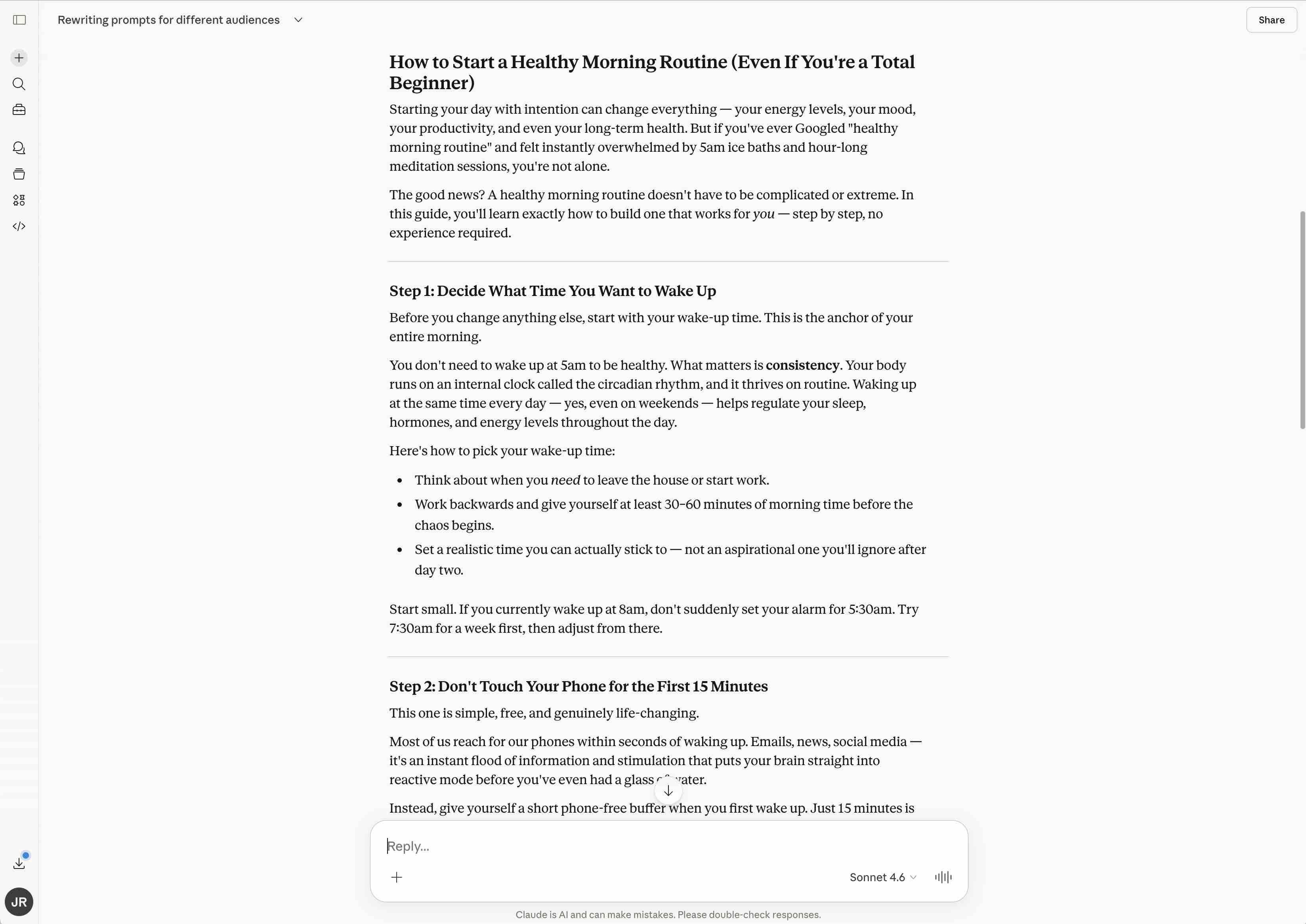
ChatGPT (OpenAI), Claude (Anthropic), and Google Gemini are the three most widely used options. All offer free tiers, though longer articles and better output quality typically come from paid plans (ChatGPT Plus is $20/month, Claude Pro is $20/month). For structured long-form content, ChatGPT-4 and Claude tend to produce the most well-organised output.
Step 2 — Write a strong prompt
The quality of your output depends heavily on how you frame the request. A vague prompt produces generic content; a specific, detailed prompt produces something much closer to publishable. Include:
- Your target keyword (the phrase you want to rank for in Google)
- The intended audience — be specific (e.g. “small business owners with no technical background”)
- Article type: how-to guide, listicle, comparison, opinion piece
- Desired word count
- Tone of voice (e.g. conversational, professional, direct, friendly)
- Specific headings or sections you want covered
Step 3 — Review and edit the output
AI-generated content needs a human pass before it goes anywhere near your website. Watch for:
- Factual inaccuracies — AI tools can state incorrect information confidently
- Generic or repetitive phrasing — tighten it to match your voice
- Missing specific expertise — add your own knowledge, examples, or opinions
- Overly formal or robotic language — read it aloud to catch it
Step 4 — Paste into WordPress and format
Copy the content into the WordPress block editor. This step is more involved than it sounds. You’ll typically need to:
- Recreate heading blocks (H2, H3) — they often paste as plain text
- Break up dense paragraphs for readability on screen
- Add a table of contents manually if your theme doesn’t generate one
- Clean up any stray characters or double spacing from the copy-paste
On a 1,500-word article, formatting alone can take 10–15 minutes.
Step 5 — Source, generate, and add your images
This is one of the most time-consuming parts of the manual method — and it’s often underestimated. A well-illustrated article typically needs a featured image, plus at least two or three inline images to break up the content and support the points being made.
You have several options for sourcing images:
- Stock photo sites: Unsplash and Pexels offer free images. Shutterstock and Adobe Stock offer higher quality with a subscription (typically $30–50/month).
- AI image generators: Midjourney, DALL-E 3 (built into ChatGPT Plus), Adobe Firefly, and Google ImageFX can generate custom visuals from a text prompt. Quality varies, and most have usage limits on free tiers.
- Screenshots or custom graphics: for technical or instructional content, your own screenshots are often the most relevant and credible option. Tools like Canva can help you add annotations or create simple diagrams.

For each image you use, you’ll need to:
- Download or export the image file
- Resize and compress it for web (tools like Squoosh or TinyPNG are free)
- Upload it to your WordPress media library
- Insert it into the correct position in the article using the image block
- Write descriptive alt text for each image — important for both accessibility and SEO
- Set the featured image separately in the post settings panel
Done carefully, sourcing and adding images for a single article can add another 15–20 minutes to the process.
Step 6 — Fill in your SEO fields
If you’re using Yoast SEO or Rank Math, you’ll need to write your meta title, meta description, and focus keyword manually. You can prompt your AI tool to generate these for you — just paste the article in and ask — but it’s still an additional copy-paste step, and you’ll want to review the output before using it.
Step 7 — Publish or schedule
Review the post one final time, assign a category and tags, and hit publish — or use WordPress’s built-in scheduling to set a future publication date.
Done carefully, this entire process takes 30–45 minutes per article. It’s manageable for occasional posts, but at any volume it becomes a significant time commitment.
Method 2: The Plugin Approach — Faster, Automated, Scalable
The second approach uses a dedicated AI blog writing plugin that’s built specifically for WordPress content production. Noteworthy plugins in this category include BlogWolf, RankMath and AI Engine. Rather than stitching together several tools and doing the assembly work yourself, you hand the whole workflow to a single piece of software. You can read our comparison of the top 15 WordPress blog writer plugins here.
These plugins connect directly to your WordPress site. You provide a target keyword, configure your preferences, and the plugin researches the topic, writes the article, generates and places images throughout the content, handles all the SEO fields, and publishes directly to your site — without you opening a second tab.
The most capable plugins also offer an Auto-Pilot mode: you define your keywords and a publishing schedule, and the plugin generates and publishes articles on its own, on a recurring basis. For businesses that rely on consistent content output for SEO, this removes the bottleneck entirely.
What a good AI blog writing plugin handles for you
The best plugins in this category take care of everything the manual method requires you to do by hand:
- Article research and writing from a target keyword
- Full formatting — headings, paragraphs, lists, tables of contents
- Featured image generation and assignment
- Inline images generated and placed throughout the article — with descriptive alt text written automatically
- Meta title and meta description
- Schema markup for better search visibility
- Internal linking to other posts on your site
- Direct publishing to WordPress — no copy-paste required
- Scheduled or automated publishing via Auto-Pilot
The tradeoff is that you have less moment-to-moment control over the output. Most plugins let you configure tone, length, article type, and image style — but you’re working from settings rather than crafting each sentence yourself. For most use cases, the time saving makes this an easy trade.
What does it cost?
Plugin pricing varies. Some tools use monthly subscriptions; others (including BlogWolf) use a pay-as-you-go credit model where you buy credits and use them as needed, with no ongoing commitment. At the more affordable end of the market, fully produced articles with images and SEO metadata cost in the range of $1–3 each — a fraction of what your time is worth.
The relevant cost comparison for the manual method isn’t a writer’s fee — AI is doing the writing in both cases. It’s your subscription costs (ChatGPT Plus or Claude Pro at around $20/month, plus an image tool if you need one) and, more significantly, your time. At 30–45 minutes per article, time is by far the larger cost.
A recommended tool: BlogWolf
For WordPress users, BlogWolf is one of the most straightforward options available. It works either as a plugin installed directly in your WordPress dashboard, or as a standalone web app that connects to your site via an Application Password.
BlogWolf uses a pay-as-you-go credit system — no subscription required. Articles start from around $1 each, and you can sign up for 50 free credits with no credit card needed, which is enough to generate around a dozen articles and properly evaluate the output.
How to get started with the plugin method (using BlogWolf)
Step 1 — Install the plugin
In your WordPress admin, go to Plugins > Add New and search for “BlogWolf”. Click Install, then Activate. Alternatively, download the plugin ZIP from blogwolf.io and upload it via Plugins > Upload Plugin. If you prefer not to install a plugin, the BlogWolf web app connects to WordPress using an Application Password (found under Users > Your Profile).
Step 2 — Sign up and connect
Create your free account at blogwolf.io. You’ll receive 50 free credits on sign-up. Connection to your website via the plugin is automatic.
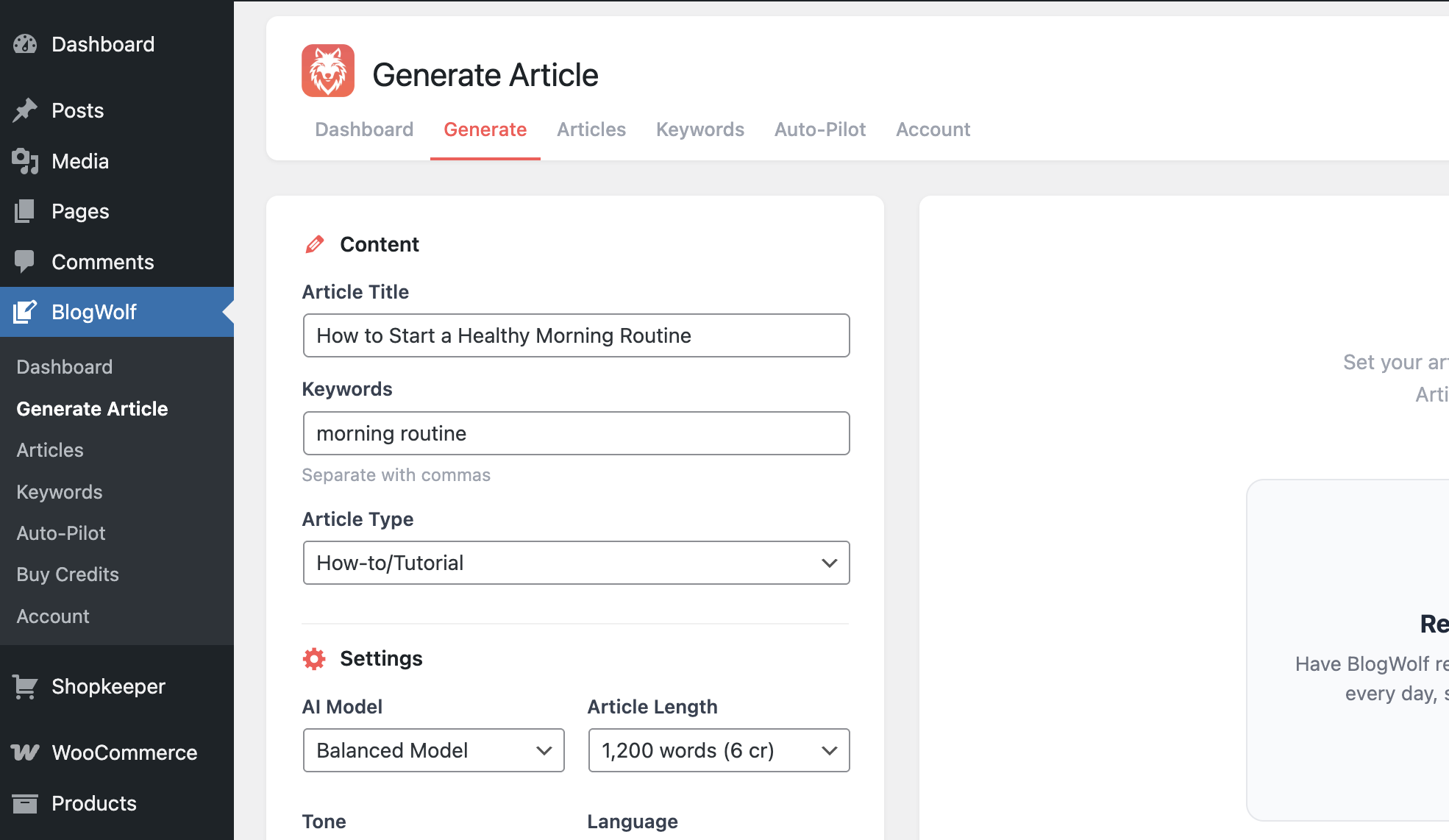
Step 3 — Enter your title and target keyword
In the ‘Generate Article’ tab of the plugin, enter an article title and the search term you want to rank for. You can come up with keywords yourself or use BlogWolf’s AI suggestion tool in the Keyword Manager.
Step 4 — Configure your article settings
Set your preferences: article type, length (500–5,000 words), tone of voice, language and dialect, image style, whether to include a table of contents, and which WordPress category and author to assign. Configuration only takes a few seconds.
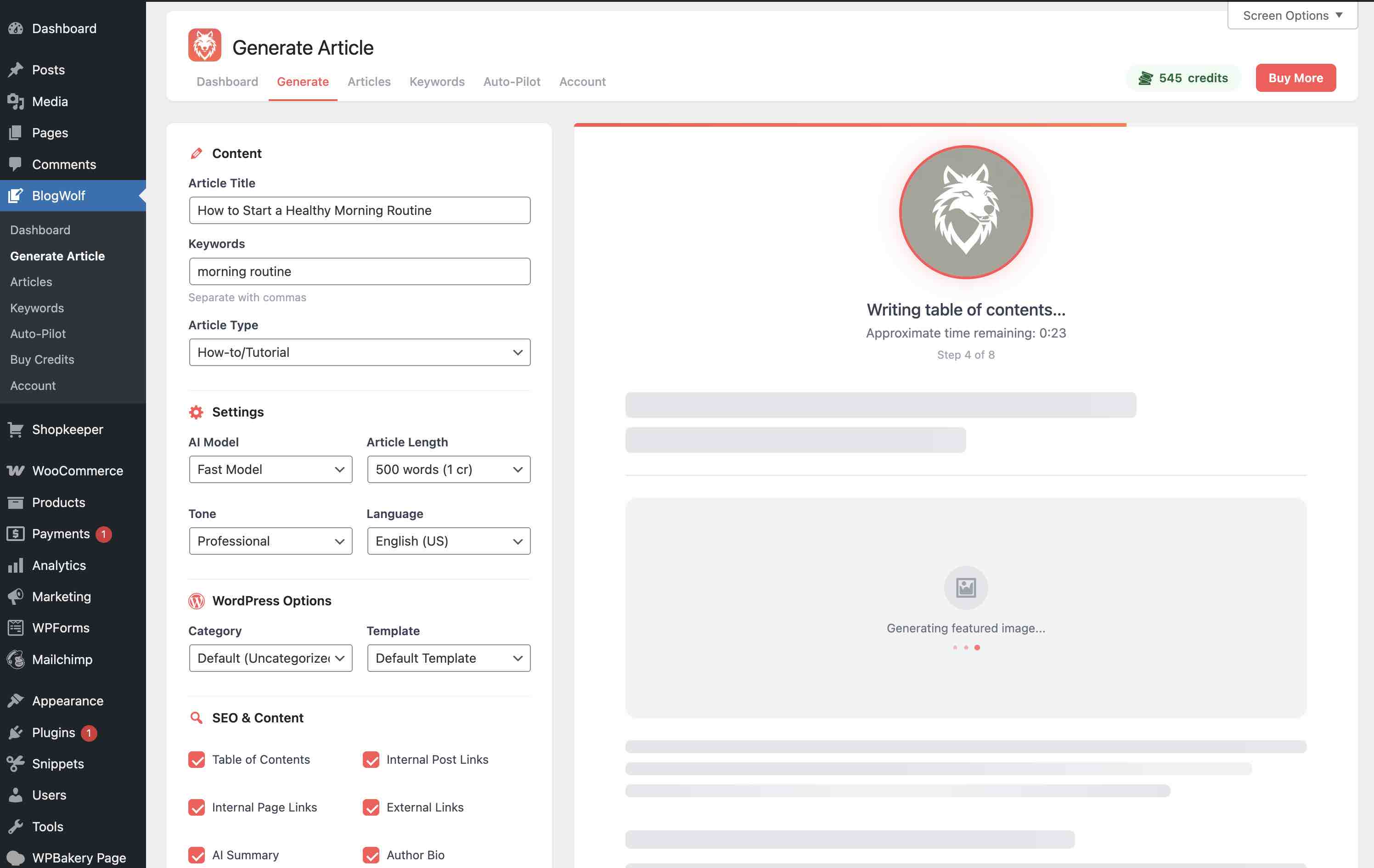
Step 5 — Generate
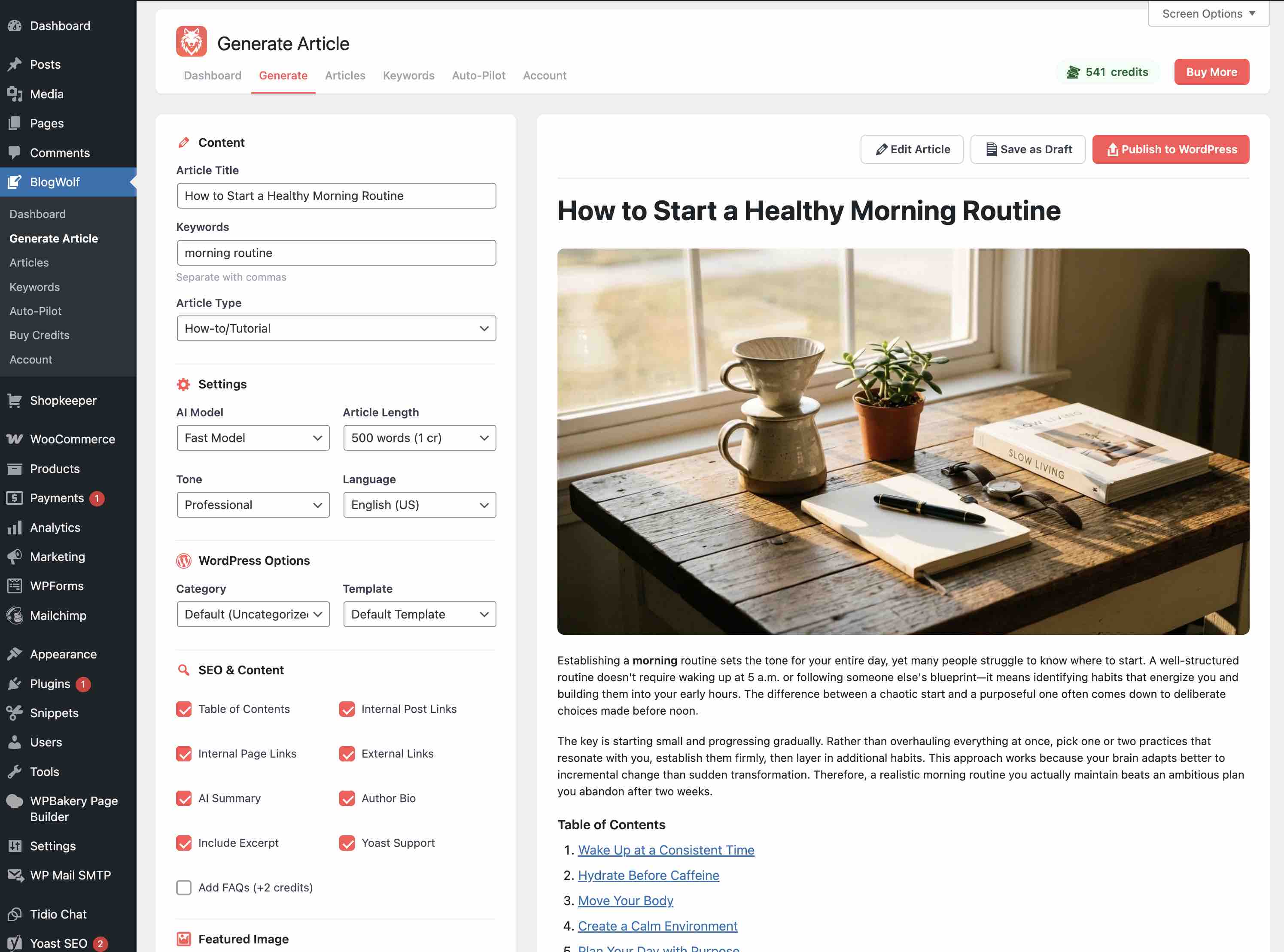
Click ‘Generate’. BlogWolf researches and writes the article, generates and embeds images throughout the content (with alt text), handles your meta description and schema markup, adds internal links, and formats everything for WordPress. In most cases this takes under two minutes.
Step 6 — Review and publish
The finished article is displayed in the BlogWolf preview window for you to review. You can edit it, publish it immediately to your WordPress blog or save it as a draft.
Alternatively, you can activate Auto-Pilot to let BlogWolf generate and publish articles automatically on a recurring schedule without your input. You can create up to 50 automations from the Auto-Pilot tab, each targeting different topics, themes and keywords.
Try BlogWolf Free
50 free credits on sign-up – enough for around a dozen articles. No credit card required.
Get Started Free →Will AI-Written Articles Rank on Google?
This is the most common concern — and it’s a fair one. The short answer: yes, AI-written content can rank, provided it meets Google’s quality expectations.
Google’s public stance is that it evaluates content on quality, not on how it was produced. What gets penalised is thin, unhelpful, or deceptive content — regardless of whether a human or an AI wrote it.
That means the risk isn’t in using AI to write your articles. The risk is in publishing unreviewed, low-quality output without adding anything of value. The articles that rank well — AI-assisted or otherwise — are the ones that genuinely answer the reader’s question better than competing pages do.
For the manual method, this means reviewing your AI’s draft carefully and adding your own expertise. For the plugin method, it means choosing a tool that produces structured, well-optimised content by default, then doing a quick review pass before publishing.
Best practice: treat any AI-generated article as a strong first draft. Add a specific example from your experience, a data point relevant to your industry, or a practical tip that only someone with hands-on knowledge would know. This is what separates AI-assisted content that ranks from AI-assisted content that doesn’t.
The compounding value of publishing consistently
One of the most underappreciated aspects of content marketing is that consistency matters as much as quality. Publishing one excellent article a month is less effective for SEO than publishing one solid article a week. Search engines reward sites that publish regularly — it signals an active, authoritative presence.
The manual method makes consistency hard to sustain. When each article takes 30–45 minutes of focused effort, it’s easy to let publishing slip when other priorities take over.
The plugin method removes that friction. With Auto-Pilot, you set your keywords and frequency once, and your blog grows on a schedule — whether you’re heads-down on a project, on holiday, or simply busy. For businesses where content is part of the growth strategy rather than the entire job, this shift from active effort to background automation is often transformative.
Key Takeaways
✓ Summary
- There are two ways to write a WordPress article with AI: the manual method (ChatGPT or Claude + copy-paste into WordPress) and the plugin method (a dedicated tool that handles everything in one workflow).
- The manual method takes 30–45 minutes per article and requires juggling multiple tools — an AI chatbot, image sourcing, Yoast, and the WordPress block editor.
- The plugin method takes under 2 minutes and handles writing, inline images, alt text, meta description, schema markup, internal linking, and direct publishing to WordPress automatically.
- AI-written content can rank on Google — what matters is quality and genuine value for the reader, not how the content was produced.
- Consistency matters as much as quality for long-term SEO; the plugin method’s Auto-Pilot feature removes the bottleneck of manual publishing entirely.
- Pay-as-you-go plugins like BlogWolf cost from around $1 per article — far less than the time cost of writing manually at scale.
Frequently Asked Questions
Which AI tool is best for writing WordPress articles manually?
ChatGPT-4 and Claude Pro are the most capable options for long-form structured content. Both cost around $20/month. Google Gemini’s free tier is also solid for shorter pieces. The best choice depends on your writing style — it’s worth testing all three before committing to a subscription.
What’s the best free option for generating images for my articles?
For AI-generated images, Google ImageFX (free) and Bing Image Creator (free, powered by DALL-E 3) are some of the strongest free options. Unsplash and Pexels offer high-quality free stock photography. If you need more control or branded graphics, Canva’s free tier is a good starting point.
Do I need to add alt text to images?
Yes, and it’s one of the most commonly skipped SEO tasks. Alt text tells search engines what an image contains, which contributes to image search rankings and overall page relevance signals. In the manual method, you’ll need to write alt text for each image yourself. AI blog writing plugins like BlogWolf generate alt text automatically.
Will AI blog writing plugins produce original content?
Yes — reputable AI writing plugins generate original content for each article based on your keyword and settings. They don’t scrape or reproduce existing content. That said, it’s always worth running a quick originality check on important articles, particularly in competitive niches.
How much does it cost to use the plugin method?
It depends on the tool. BlogWolf uses pay-as-you-go credits with no subscription — articles start from around $1 each for a 1,500-word piece. You get 50 free credits on sign-up (no credit card required), which is enough to generate around a dozen articles.
Can I use the plugin method without installing anything in WordPress?
Yes. BlogWolf offers a standalone web app that connects to your WordPress site via an Application Password. You generate articles in the web app and they publish directly to your site — no plugin installation required.
The bottom line
There’s no single right answer to how to write a WordPress article with AI. The manual method gives you full control and works well at low volume. The plugin method saves substantial time, handles images and SEO automatically, and scales as far as you need it to.
For most business owners and marketers, the manual approach makes sense for high-priority, heavily personalised content — a cornerstone page, a detailed case study, a piece where your specific voice really matters. The plugin approach makes sense for everything else: regular blog posts, informational content, and the consistent publishing that drives long-term SEO growth.
If you haven’t tried the plugin method yet, BlogWolf’s free sign-up gives you 50 credits to explore it properly — enough to produce a dozen articles and see what the output actually looks like on your site.
Try BlogWolf free — 50 credits, no credit card required: blogwolf.io

Joseph Russell
Award-winning UX Designer and Design Writer. Joseph has spent the last 17 years designing digital user experiences and writing about design and entrepreneurship. He founded BlogWolf after spending thousands of hours on content creation and realizing there had to be a better way. Joseph is the Co-Founder of mobile app agency DreamWalk and Head of UX & Growth at Easy Weddings.
Connect on LinkedIn →